Introduction
Before we begin
The following is a path forward to set up your development laptop. It is not the path. Asking your fellow mojos will offer many alternatives.
Try it out. Experiment. Change what you don't like. Don't be afraid to invest time in your workflow.
Make sure you're connected to the following services before you begin:
- Mojotech GSuite
- Mojotech Slack
- BambooHR (use gauth)
- PivotalTracker (use gauth)
- Zeplin (use gauth)
These examples assume osx. Linux users will have to use a different package manager and find the corresponding names for packages e.g. - apt install python3-pip. Linux users should skip the brew, iTerm2, and bash steps.
Brew (osx only)
Brew is package manager for mac osx. https://brew.sh/
xcode-select --install
/bin/bash -c "$(curl -fsSL https://raw.githubusercontent.com/Homebrew/install/master/install.sh)"
iTerm2 (osx only)
Terminal replacement for mac os x. https://www.iterm2.com
brew install --cask iterm2
Bash (osx only)
The missing semester uses bash for its examples. A number of open source projects also assume bash for examples. If you have a preferred shell already, use that and disregard the bash related steps.
chsh -s /bin/bash
Opening iterm2 should now display the bash shell prompt. You can check that this is working correctly by entering this command:
echo $SHELL
It should return /bin/bash.
if you see a message that says The default interactive shell is now zsh., you can surpress it by adding this line to your ~/.bash_profile file:
export BASH_SILENCE_DEPRECATION_WARNING=1
Improved bash status line
The default statusline for bash is far from helpful. We can remedy that quickly by following a few simple steps.
Start by running this to install the starship statusline:
brew install starship
After that finishes, append the following to the end of your ~/.bash_profile (~/.bashrc on linux):
eval "$(starship init bash)"
If you're on linux or dont have access to brew, you can run this command
sh -c "$(curl -fsSL https://starship.rs/install.sh)"
other install methods can be found here
You can run starship --help to get a quick overview of the statusline functionality or visit the website for more in-depth docs.
The final step to set up your new statusline is to get a font with support for icons, these are called NerdFonts, installing them is simple:
brew tap homebrew/cask-fonts
brew install --cask font-blex-mono-nerd-font
if you are on linux or dont have access to brew, you can download the font
directly here. Once downloaded, open the unzip the package, select all of the .otf files and double click them. This will launch the installation prompt.
Once you finish downloading and installing your NerdFont, use it by opening your iTerm preferences, going to the Profile section, and selecting the Text tab.
Relogging should present a new shell statusline for the current working directory and git status if you are in a git directory.
fzf
https://github.com/junegunn/fzf
fzf is a fuzzy file finder with shell integration (CTRL-T, CTRL-R, and ALT-C)
brew install fzf
/usr/local/opt/fzf/install
The shell integration commands should present the fuzzy finder for:
- files: CTRL-T
- shell history: CTRL-R
- cd directory: ALT-C
git
brew install git
Send your github handle to @craig (Craig Jolicoeur) on slack.
Set up your ssh key for authentication
ssh-keygen -t rsa -b 4096
cat ~/.ssh/id_rsa.pub | pbcopy
pbcopy will copy STDOUT into your clipboard. You can then paste into your account ssh key on github.com.
docker
https://hub.docker.com/editions/community/docker-ce-desktop-mac/
https://download.docker.com/mac/stable/Docker.dmg
- Install the dmg image.
- A Docker whale icon appears in the status menu. As soon as the whale icon appears, the symbolic links for docker, docker-compose, docker-credential-osxkeychain and docker-machine are created in /usr/local/bin.
- Test docker
docker run hello-world
asdf
Version manager tool. Allows running multiple versions of language runtimes that can be controlled per project.
https://asdf-vm.com/#/core-manage-asdf-vm
brew install asdf
Restart your terminal.
asdf plugin add ruby
asdf plugin add nodejs
asdf plugin add yarn
You can also install the appropriate versions if the project has a .tool-versions file.
cd helios2 # or whether helios2 is checked out for you
asdf install
If asdf install fails, you are likely missing some system dependencies. The asdf output will likely include instructions to install them like:
The Ruby readline extension was not compiled.
ERROR: Ruby install aborted due to missing extensions
Try running `apt-get install -y libreadline-dev` to fetch missing dependencies.
Useful Chrome Extensions
React Dev Tools
Inspect the react components in the browser similiar to the element inspector
https://chrome.google.com/webstore/detail/react-developer-tools/fmkadmapgofadopljbjfkapdkoienihi?hl=en
Apollo Client Developer Tools
Inspect and run graphql queries
https://chrome.google.com/webstore/detail/apollo-client-developer-t/jdkknkkbebbapilgoeccciglkfbmbnfm?hl=en-US
Editors
Common editors and recommended plugins
Visual Code
https://marketplace.visualstudio.com/items?itemName=rebornix.Ruby
https://marketplace.visualstudio.com/items?itemName=dbaeumer.vscode-eslint
https://marketplace.visualstudio.com/items?itemName=esbenp.prettier-vscode
https://marketplace.visualstudio.com/items?itemName=MS-vsliveshare.vsliveshare
Resources


Projects
Current
Save 58
Inspiration: Kurzgesagt – In a Nutshell: This Video Might Save 58 Lives Next Week
Hypothesis: Can an automated message (email, tweet, slack, video) save lives?
Premise: Can providing statistically likely causes for death or injury for a specific person's demographic (age, gender, profession) combined with current conditions (date, geography, weather) result in that person being mindful of the particular danger to save their life? Pros:
- This is a deceptively hard problem involving multi dimensional. big data. It could easily keep intern teams occupied for several years
- Decomposable. Its possible to focus this project into smaller, month long deliverables that are challenging.
- Motivational mission. It feels good to do some good.
- Potentially marketable as doing good
Cons:
- Delicate topics for the work place. See the video.
- Not profitable without turning people into the product.
Business Value
- Data science tooling
- iceburg
- developing a model
- Data/ETL
- repeatable data scraping
- automated data evaluation
- New technologies
- sveltekit
- nix/flake
- tauri
- multi dimension database
- automated web scrapping
- biome
Next steps
- Week 0
- Evaluate data
- Boot strap project
- Repo
- monorepo
- think about directory structure for data, server, client
- Tooling: direnv / nix flake <- Daniel or Kyle?
- Typescript/Sveltekit
- tooling/one off scripts can be polyglot
- Linter/formatter - biome
- Postgresql docker?
- CI - github actions
- README
- Repo
- Management
- Assign primary mentors
- pick days in office
- Laptops - MCD acting
- github/slack access
- Assign primary mentors
- Impact map/Stories
- Review notes
- Need more challenges
- Week 1
- The missing semester
- Review the first six chapters
- Command-line Environment and Version Control (Git) will be really helpful
- Ask lots of questions
- link 4cs
- Tool setup
- Checkout github repo. Work through README
- Ask fellow mojos! #internship #engineering
- First commit?
- Discovery
- The missing semester
- Week 2 - atomic commits / unraveling git commit
- auth
- Implement boilerplate design? Jesse has a headless UI library he likes
- Anonymous user landing page
- Authenticated user page
- privacy policy
- Scraping/Data collection
- Aggregate data
- Automate import into database
- unit test / some web output for
Week before day light savings time, "start shifting your schedule by 15 minutes earlier/later. heart attacks and car crashes increase after day light savings time due to sleep deprivation"
- video parity
- 3 million people will watch this video
- 15-35
- living in western countries
- driving
- 8 in car crash next week. 416 of you over the next year. 2m29s
- 2: 30% from speeding
- 2: 25% from drinking and driving
- 1: from distracted
- 3: from not wearing a seat belt
- 26 by falling in the next year. 5m17s
- scaffolding, ladders, hiking
- 1 of you will drown next week. 6m07s
- over estimate swimming abilities
- go into the water drunk
- cruise ships
- 10 of you will die from self harm next week 7m12s
- crisis situations triggered by traumatic events and extraordinary situations
- resources for help
- 5 of you will from cancer next week 8m52s
- regular checkups and screenings
- sunscreen
- 8 in car crash next week. 416 of you over the next year. 2m29s
- sharing
- 3 million people will watch this video
- Week 3
- Ticket work.
- Week 4
- Ticket work.
Shallow vs deep
Shallow is a first step to get something working. Deep is a thorough tech investigation
Shallow
- Json / csv in git
- Manual algorithm
- Web app only
- Manual notification trigger via web
- Manual data scrapping
Deep
- Apache iceburg for storage sharing. Data lake. <- Eric Gibb
- Multi dimension data in postgresql / vector storage
- Desktop/mobile version via Tauri
- Worker queue for pre calculating and notifications. Different queue/worker than previous mojo work not redis/sidekiq/bullmq
- Automated LLMs scrapping
Thoughts
We should have a very clear privacy policy
Landing on the page should engage the user with data driven from form. This can lead towards creating an account to provide more specific information on a schedule.
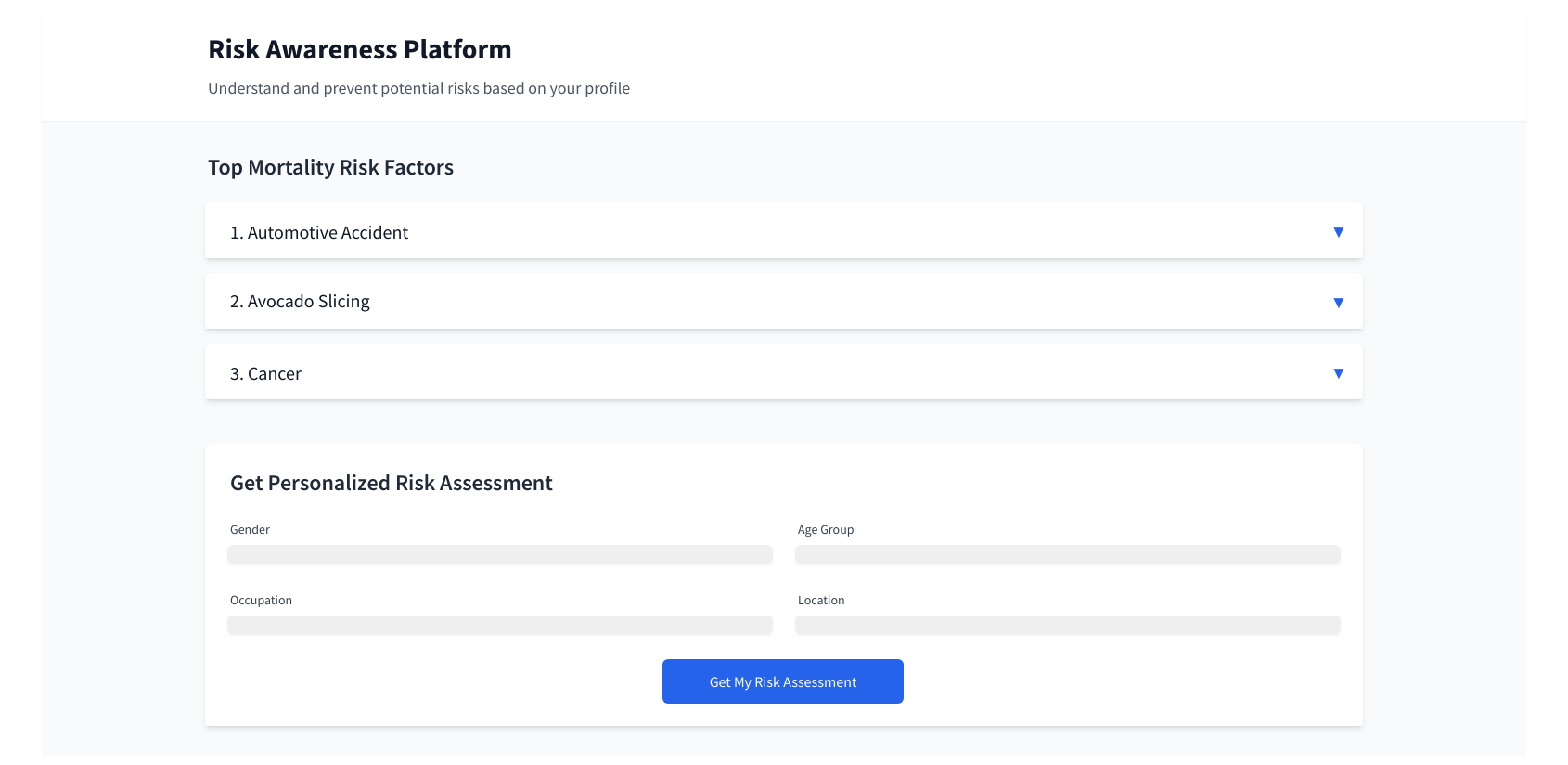
Dog Fooding. Plugging in "Software Engineer" + "Remote" + "No standing desk" = "make sure to walk around every hour"
Living in downtown Manhatten on a Sunday morning, "be careful slicing the bagel this morning. X% of ER visits from from bagel slices today"
Week before day light savings time, "start shifting your schedule by 15 minutes earlier/later. heart attacks and car crashes increase after day light savings time due to sleep deprivation"
Needs to be friendly and not anxiety inducing. Carson mentioned the Citizen app as the antithesis.
Wireframe
Investigation
- Rhode Island
- Death Records
- Injury Surveillance Data
- Hospital Discharge Data
- Note: the request form seems to require $100 per data file and year processing fee. ~$2000 + processing time
- Kurzgesagt Sources
- The cause-of-death data have been extracted from WHO’s Mortality Database using the Cause of Death Explorer, and extracting the data for our demographic for each death cause mentioned in the video, as well as the total deaths from all causes in our demographic to calculate proportions.
- Please keep in mind the following considerations on this data:
- Stadiums of similar capacity include the Allianz Arena in Munich or the Empower Field in Denver.
- Empower Field: “About us” (retrieved 2024)
- World Health Organization, European region: “SDR(15-29), All causes, per 100 000” (retrieved 2024)
- Our World in Data: “Annual death rate by age group, United States, 2021”
- Our World in Data: “Terrorism deaths rate, 2011 to 2021 (retrieved 2024)
- A Westman et al. Parachuting from fixed objects: descriptive study of 106 fatal events in BASE jumping 1981–2006. Br J Sports Med. 2008
- Mei-Dan, Omer et al. (2013): “Fatalities in Wingsuit BASE Jumping” Wilderness & Environmental Medicine, vol. 24, 4, 321-327.
- U.S. department of energy: “Average Annual Vehicle Miles Traveled per Vehicle by Major Vehicle Category” (retrieved 2024)
- United States Department of Transportation: “Motorcycle Safety”
- World Health Organization Mortality Database: “Causes of Death Explorer: Road traffic accidents”
- Hunter, Luke (2020): “The Cheetah’s Speed Limit” Wild View, Wildlife Conservation Society
- International Council on Clean Transportation (2022): “European Market vehicle statistics”
- U.S. Environmental Protection Agency Automotive Trends Report (2023): “Automotive Trends Report“
- National Park Service U.S.: “The statue of Liberty” (retrieved 2024)
- Petrof: “What is the size of the grand piano and the upright piano?” (retrieved 2024)
- Royal Society for the Prevention of Accidents (2018): “Road Safety Factsheet”
- Quote: “Inappropriate speed contributes to around 11% of all injury collisions reported to the police, 15% of crashes resulting in a serious injury and 24% of collisions that result in a death. This includes both ‘excessive speed’, when the speed limit is exceeded but also driving or riding within the speed limit when this is too fast for the conditions at the time (for example, in poor weather, poor visibility or high pedestrian activity).”
- World Health Organization: “Managing speed” (2017)
- Perez, Miguel A. et al (2021): “Factors modifying the likelihood of speeding behaviors based on naturalistic driving data”, Accident Analysis & Prevention, vol. 159, 106267
- World Health Organization (2023): “Road traffic injuries”
- National Highway Traffic Safety Administration (2020): “Traffic Safety Facts: Young Drivers”
- World Health Organization (2019): “SAFER: Advance and enforce drink driving counter measures”
- European Comission (2023): “New report from the European Road Safety Observatory: focus on drink driving”
- European Comission (2022): “Road Safety Thematic Report – Driver distraction”
- National Highway Traffic Safety Administration (2021): “Distracted Driving 2019”
- Australian Automobile Association: “Distracted driving” (retrieved 2024)
- IFAB: "The Field of Play" (retrieved 2024)
- National Highway Traffic Safety Administration (2020): “Traffic Safety Facts: Young Drivers”
- European Transport Safety Council (2006): “Seat Belt Reminders: Implementing advanced safety technology in Europe’s cars”
- U.S. Centers for Disease Control and Prevention (2024): “Leading Causes of Nonfatal Emergency Department Visits”
- U.S. Census bureau: “National Population by Characteristics: 2020-2023” (retrieved 2024)
- World Health Organization Mortality Database: “Causes of Death Explorer: Falls”
- World Health Organization Mortality Database: “Causes of Death Explorer: Drownings”
- Armstrong, Erika J.; Erskine, Kevin L (2018): “Investigation of Drowning Deaths: A Practical Review”
- U.S. Centers for Disease Control and Prevention (2024): “Drowning Facts”
- U.S. Centers for Disease Control and Prevention (2024):“WISQARS Leading Causes of Death Visualization Tool: Ages 5 to 14”
- — Also for the love of god, be careful on cruise ships – if you fall into the water you have a 60% chance of dying.
- Gönel, Orhan; Çiçek, İsmail (2020): “Statistical analysis of Man Overboard (MOB) incidents”. Chapter in “Engineering and Architecture Sciences: Theory, Current Research and New Trends”, edited by Dr. Emine Yildiz Kuyrikçu . IVPE Publisher.
- World Health Organization Mortality Database: “Causes of Death Explorer: Self-inflicted injuries”
- Cooper, Jessica; Appleby, Louise; Amos, T. (2002): “Life events preceding suicide by young people” Social psychiatry and psychiatric epidemiology, vol. 37, 6, 271–275
- Liu, Richard T.; Miller, Ivan (2014): “Life events and suicidal ideation and behavior: A systematic review” Clinical Psychology Review, vol. 34, 3, 181-192
- Bader, S. et al. (2021): “Warning signs of suicide attempts and risk of suicidal recurrence” European Psychiatry, vol. 64
- Kim, Eun Ji et al. (2022): “Comparing warning signs of suicide between suicide decedents with depression and those non-diagnosed psychiatric disorders” Suicide Life Threat Behavior, vol. 52, 178-189
- Harvard T.H. Chan School of Public Health: “Attempters’ Longterm Survival”, 2002
- World Health Organization Mortality Database: “Causes of Death Explorer: Malignant Neoplasms”
- National Cancer Institute: “Adolescents and Young Adults with Cancer”
- Trama, Annalisa et al. (2023): “Cancer burden in adolescents and young adults in Europe”, European Society for Medical Oncology, vol. 8,1
- Everyone should know how their breasts normally look and feel and report any changes to a health care provider right away. It is recommended to perform a breast self-exam once a month:
- If you have testicles and have already undergone puberty, some doctors also recommend a monthly testicular self-exam to get to know what's normal for you and to be able to report any changes to your healthcare provider without delay:
- Testicular Cancer Awareness foundation: “Monthly testicular self-exam” (retrieved 2024) https://www.testicularcancerawarenessfoundation.org/self-exam-resources
- Though not customarily recommended due to the risk of false positives, it is possible to perform a thyroid self-examination. However, keep in mind that the thyroid gland may appear enlarged or bumps on your neck may appear for many reasons other than cancer. #American Association of Clinical Endocrinology: “How to check your thyroid” (retrieved 2024) https://www.aace.com/disease-and-conditions/thyroid/how-check-your-thyroid
- United States
- United Kingdom
- https://www.cancerresearchuk.org/health-professional/cancer-screening
- Canadahttps://cancer.ca/en/cancer-information/find-cancer-early/screening-for-cancer
- Australiahttps://screeningresources.cancervic.org.au/sections/national-cancer-screening-programs
- American Cancer Society: “Can Melanoma Skin Cancer Be Prevented?” (retrieved 2024)
- U.S. Centers for Disease Control and Prevention (2023): “Reducing Risk for Skin Cancer”
- Melanoma Institute Australia: “How to Prevent Melanoma” (retrieved 2024)
- World Health Organization Mortality Database: “Causes of Death Explorer: Malignant Skin Melanoma”
Legacy
Helios
Helios is our weather/welcome display for the Providence and Boulder front door. It serves as an opportunity to welcome guests and show off some our technical expertise.
- Front-end
- react: https://reactjs.org/
- apollo client: https://www.apollographql.com/docs/react/
- ramdajs: https://ramdajs.com/
- matter.js: http://brm.io/matter-js/
- Back-end
- ruby on rails: https://rubyonrails.org/
- graphql-ruby: https://github.com/rmosolgo/graphql-ruby
- postgresql: https://www.postgresql.org/
- redis: https://redis.io/
- APIs
- graphql: https://graphql.org/
- docker: https://www.docker.com/
StandupHub
StandupHub is a web service to easily track your tasks and their statuses for standup.
Stack
- PT issues: https://www.pivotaltracker.com/n/projects/1553257
- Slack: #standuphub
- Front-end
- github: https://github.com/mojotech/standup-web
- react 16: https://reactjs.org/
- redux: https://redux.js.org/
- Back-end
- github: https://github.com/mojotech/standup-api-ex
- Phoenix: https://www.phoenixframework.org/
- Elixir: https://elixir-lang.org/
- Back-end (legacy)
- docker: https://www.docker.com/
Startup
cd standuphub-api-ex
# start a pgsl instance on localhost:5432. You can use an OS service instead of docker
docker-compose up db
# start the phoenix server on localhost:4000 connected to localhost for database
mix phx.server
cd ../standuphub-web
# start webpack server on localhost:3000 pointed to the local phoenix server the API server
REACT_APP_API_SERVER=http://localhost:4000 yarn start
Project Ideas
Meeting preparation
A tool to help meeting organizers and attendees better prepare for and record notes from a meeting. One of the discoveries from the PT Estimator requirements gathering is PMs are struggling to get devs to read and comment on stories before a planning meeting.
- Provide a means to create an agenda
- Easy to find and read meeting materials (maybe a reminder X before a meeting to review notes if you haven't)
- Estimate how long it takes to read the materials to not have rushed meeting prep for attendees
- Tool for taking/sharing notes from a meeting
Enroll Me for Slack
Long conversation in slack are often hard to stay on top of during the work day. This tool would some how extract the relevant portions of a conversation for an enrolled user to read at a later time.
mojotech new tab homepage
Browser extension that brought in like upcoming bdays, lunches for the week, holidays, who is out of the office, upcoming team meetings, how we’re tracking on goals
Speed coding challenge
Competitive games exist for typing and code implementation, but there appears to be a gap for reshaping code in your editor/IDE of choice. This would present editor challenges like:
- Switch case of vars
- Reorder words, sentences, paragraphs
- Advanced find/replace
- Extract a method
- Swap keys/values in a hash
- Repeated steps / macros
Problems:
- IO monitoring. How do we tell if the developer is started/done?
- Feedback. How we let the developer know there is still work to perform.
- Displaying keys pressed.
- Recording. It would be fun to see how others solve the problem in their editor.
Helios frontend write (sveltejs)
This is an exercise in rewriting the helios frontend in sveltejs, rollup, and polka.
Problems:
- Define an interface for the client (modernizr)
- Learn how to use sveltejs, rollup, polka
Where's the line
Description: Every year watching the super bowl, someone repeats the joke quoting some fan at a stadium asking "where's the line" for first down. This project would capture a live football game with the camera and draw in the line on the field beneath the players.
Problems:
- Detecting football players
- Drawing a line on a field beneath players at a specific vector
- Querying the status of the game (NFL API?)
- Determining where the camera is looking on a field
- Determining where in the camera FOV the line should be drawn
Maybe use ML? If so, new problems:
- Collecting data of players vs field
- Collecting data of correctly drawn lines
Open source jamboard
Description: Google jamboard but open source. Will wants to use CRDTs.
Jamboard alternatives (none of them open source): https://www.techrepublic.com/article/google-jamboard-too-pricy-here-are-4-low-cost-virtual-whiteboard-app-alternatives/
Problems:
- Setting up a server for asynchronous communication with clients
- Preview (Google cast display?) and Edit (laptop/tablet)
- Dealing with CRDT network chattiness
- Integrating with third party document/file services
Web app monitor app
Description: app that monitors a domain/url for a specific http response (Craig J had worked on a previous version with a former intern)
Apple two factor auth forwarded
Description: What is happening right now is we have 2 factor codes that usually go to an Apple device that is logged in on another device. If that isn’t working you can text a code to the phone number on file. The issue with that is, what if the person isn’t around? So my idea is to set it up with a number that will then forward it to slack.
Pull request CLI
Description: I use my editor to view the branches of pull requests since it provides a number of benefits:
- View code with preferred formatting
- Verify code formating and functionality locally
- Search for code (check for orphans or errors)
- Prototype inline alternatves
Where this breaks down is viewing and adding comments. Switching to a browser to copy/paste is tedious.
Problems:
- Consume pull requests API. github, maybe bitbucket. consolidation would be nice since I use both right now.
- Develop a CLI format for consuming/producing comments. Maybe use a linter style output since a number of editors already support that.
- Develop plugins for editors: vim, emacs, vscode.
- Integration third party issue trackers (jira, pivotal, trello). Would be nice not to search/copy/paste issue numbers when branching/committing. Could be other CLI tools.
allocate
A digital product to coordinate scheduling of constrained resources. This is used to schedule which mojos are on a project and for how long.
Technologies: rails and javascript (marionettejs)
Opportunities:
- Adopt an existing projects and address its technical debt
- Switch to react over marionette
- Integration with bamboohr API for PTO sync
- Design team has mentioned interest
- Develop an API
- Add more clients (cli, slack)
https://github.com/mojotech/allocate
Standup Hub
Project management tool to share team stand ups.
Technologies: go and react (15)
Opportunities:
- Adopt an existing projects and address its technical debt
- Upgrade react 15 to react 16
- Dog-fooding. Use the tool you're working on for tasks
- Design team has mentioned interest
- Integrations with pivotal tracker, slack, and github
- Develop an API
- Different client methods (web, cli, slack)
https://github.com/mojotech/standup-web https://github.com/mojotech/standup-api
Jacob's costing spreadsheet
Jacob maintains a google spreadsheet once a month to assess the costing of the organization which groups costs into employees, teams, departments, locations, and clients. This process is tedious and likely can be improved with an application.
Technologies: TBD
Opportunities:
- Bootstrap a new project
- Requirements gathering from an existing product owner
- Integration with existing service: allocate
GuestBook App completion (react-native)
The guestbook device is currently running a web app on an iPad. Last year, Jen and Steph began work on convertting the project to a react-native application. There are still a number of open issues to resolve before the application can go live.
Technologies: react-native
Opportunities:
- Adopt an existing projects and address its technical debt
- Design team has mentioned interest
- Working in a mobile environment
- Improve integration with slack
GuestBook App rewrite (flutter)
This is an exercise in rewriting the guestbook react-native app in dart/flutter which is an up and coming competing technology from google.
Technologies: dart/flutter
Opportunities:
- Bootstrap a new project
- Learn a completely new language
- Adopt an existing projects and address its technical debt (referencing react-native guestbook)
- Working in a mobile environment
- Present comparison between flutter and react-native
Pivotal Tracker pointing tool
A pivotal tracking tool for pointing stories as a team. Currently teams have count down through something like slack before posting estimates to avoid confirmation bias. This would provide a means to integrate with pivotal tracker and collect estimates to then be reconciled to a final estimate.
Technologies: TBD
Opportunities:
- Bootstrap a new project
- Dog-fooding. Use the tool you're working on for tasks
- Design team has mentioned interest
- Integrations with pivotal tracker and slack
- Develop an API
- Different client methods (web, cli, slack)
Existing repos: github.com/mojotech/pt-estimator/
Internship Interviews
Links
Overview
Hi
, I'm a software engineer at Mojotech. It sounds like you might be a candidate for our (apprenticeship/internship) program after speaking with
. I'd like to schedule an hour to interview with you. Our interviews are a little different from what you may have experienced elsewhere. We're not going to do any coding exercises, algorithm theory, nor puzzles; so there is no need to worry about prepping for those. Instead, I'd like to spend the time learning about what you have worked on by reviewing some of your existing code with you. This would entail you sharing your screen with your preferred editor and guiding me through your code. I'll have questions about what your code does and why it does it that way.
I like to allow for 45 minutes for the code review and 15 minutes for any follow-up questions you may have for me. Let me know when you are available this week.
Regards,
Introduction
I’ve been saying something along these lines at the start of the interview. I’m trying to clarify what I’m looking for right at the start.
We're going to be doing a code review. The goal is for you to explain the context and behavior of your application to me. I'm looking for you to help me comprehend your code base and your thought process arriving at this point, not judging your approach. I liken it to, we're not approaching the code base like an algorithms course would, looking for the big-o notation of an algorithm. Rather, we’re interested in what the algorithm does and, probably more importantly, why it does it. I'll have a lot of “what does this do?”, “can you tell me more about that?”, and “can we take a look at that method?”, kind of questions.
Pause here to see if they have any questions. If not, have the candidate start by sharing their screen and editor. Ask them to give you a high level context of what the application is, what the problem is and where you will be starting in the application.
Resist the urge to fix their code. This doesn’t really tell us anything about the candidate. If you see something like a race condition or a bug, pose the question for how they would handle the buggy scenario.
Follow along with the code. Ask them to stop and explain things you find interesting or confusing. See where they take you. Example, seeing a dbConnect parameterized query you can ask how that library works “is that string and value in an array a parameterized query?”. See if they identify the term and can make the leap to SQL escaping/SQL injection.
Joke, praise, have fun. This works best if the candidate is relaxed and is enjoying showing off their code.
Quantification
Picking an arbitrary 1-5 scale here. We can adjust if we find we need more nuance when quantifying a category. General ranking is 1 - poor, 3 - average, 5 - exceptional with 2/4 for shades of gray in between.
Overall
Would you want to mentor/work with the candidate? Use this section as an overall rating of how well the candidate did and the following sections as the details.
- present (Something didn’t sit right with me)
- likeable
- technical (Seem like a nice person)
- articulate
- passionate (Please put them on my team yesterday)
Codebase
What were you reviewing?
Communication
How well does the candidate communicate their understanding of the code to you.
- candidate either doesn’t understand their code or can’t explain what is happening beyond existing comments
- candidate explains their code well. Some prompting for technical jargon or clarification is necessary. Maybe some fumbling or examples of code copied from a tutorial or SO.
- candidate explains their code superbly. Knows where to look for any particular module/question. Libraries and examples are thoroughly understood before being added.
Passion
- going through the motions of a homework or coding camp assignment. No concern for quality or improvements
- decent size school or personal project. Notices areas of concern/improvement and desire to do so.
- Passion project that scratches an itch. Continuously improving and honing their skills.
Technical
- No interest in how the technologies/libraries in the project work
- Average understanding of the technologies used in the project.
- Deep understanding of the technologies used in the project and delving deeper into how their dependencies work or the possible alternatives to explore.
Old Notes
Need to consolidate these.
Schedule + Logistics
- Probably starting around mid-May, early June; let us know your availability and we'll have a more concrete start date later
- Usually goes until early/mid August; flexible
- Most folks usually work 9-5, but it's flexible; mostly concerned with getting work done
- Trust and trust-based time off
- Maybe check that they'll be local during that time; MT doesn't relocate interns
Expectations
- Learn what it's like to be on a team of professional developers
- Give + get good code reviews
- Get proficient with git, and learn how to write reviewable code
- You'll get something to take away from the experience
- Open-source their project OR
- Do some paid work for a client OR
- Contribute to an open source project
What it's like to work at MT
- Space for personal/professional development
- Stipend for conferences + books + a great ebook library
- MojoTime
- Sane work hours
- Consultancy
- Work for hire; experts
- Regularly rotated onto different teams/roles
- Variation + new outlooks/perspectives
- Catered lunches Tues + Fri
- Downtown PVD; lots of food/drink options
Candidates
- What do you know/what questions do you have about MT?
- What are your interests outside of coding?
- What are your short and log term goals?
- Is there any technology you really:
- Know?
- Love?
- Hate?
- Are confused by?
Mentoring
Slides
What we have
- 12 week planned internship starting May 17th
- 4 weeks onboarding onto helios
- 8 weeks sprints on main project
- Slack channel for intern help and discussion, #internship. Mentors can be added/removed from @help-interns group to be pinged for help versus passively watching.
- Markdown docs on netlify. You're looking at it. These cover basic set up, helios, and project ideas. Submit PRs on github.
- An introductory project for full stack web dev, helios.
- Pairing onto a client project
- Systra
- United Way
- https://missing.csail.mit.edu/ is a great starting point for onboarding
What we are planning
- Standups for checkin, code review, or concept discussion. Ideally one of these a week would introduce a new topic (git rebasing, functional programming, shell tooling, RDBMS, etc). The rest could be informal to discuss / share or just chat socially. Hallway may work this.
- git intro
- git rebasing intro
- how to review PRs
- how to point stories
- soft skills
- how to research a new topic
- how to ask good questions
- how to know you're stuck
- how to pair program
- Mentor stand up. Optional so don't feel obligated to join it unless you want to share or hear what is being worked on (cognizant that everyone is busy).
- Pair programming. LiveShare in Visual Code
How you can help
- Participate in #internship. More mentors mean the interns get help sooner and get to connect with more mojos.
- Review onboarding steps. We ran into some issues with nvm/rvm and need mac users to verify.
- Review docs. Find issues or areas for improvement.
- Topics/presentations for the weekly session. Think a shorter, introductory Friday tech talk.
- PM and designer for the two projects.
FAQ
-
Why #internship when we already have #engineering?
We noticed the interns from previous years were hesitant to post in #engineering and their own channel seemed to help team cohesion.
-
Why write these docs in a custom svelte app?
¯_(ツ)_/¯
2020 Internship
Schedule
- Kickoff
- 1 week orientation
- 1 week StandupHub intro
- 6 weeks project work
Goals
- Learn how to:
- write well formed PRs
- review PRs
- work with a team
- The focus is learning and the programming work is a means to an end. Dive deep into topics when researching
Kickoff
- Services to join
- github
- Slack
- Pivotal Tracker
- zeplin
- Standup Hub
- Meet the mentors
BLD



PVD



Orientation
- The missing semester
- Review the first five chapters
- Ask lots of questions
- Tool setup
- Checkout mojodocs
- Ask fellow mojos! #internship #engineering
- Reviewing StandupHub PRs
- Mentor pair programming
- Make your first PR
StandupHub intro
- Standup Hub bug fixes
- Standup Hub features
- Each PR reviewed by one other intern and one mentor
Project work
- Standup Hub v1 milestone
- Elixir/Phoenix API parity
- New design
- Github integration
- Slack integation
- MVP features
Project work (cont)
- Standup Hub v2 (maybe)
- Graphql API
- Issue tracker integration (Jira, PT)
- GCal integration
- Meeting Prep
- Prep for planning and grooming
- Search
- Meeting length tracking
- Meeting length reporting (gamification)
2021 Internship
Schedule
- Kickoff
- 1 week orientation/setup
- 2-3 weeks Helios project work
- 8 weeks project work
Goals
- Learn how to:
- write well formed PRs
- review PRs
- work with a team
- The focus is learning and the programming work is a means to an end. Dive deep into topics when researching
Kickoff
- Services to join
- github
- Slack
- Pivotal Tracker
- zeplin
- Standup Hub
- Meet the mentors
BLD


PVD


Orientation
- The missing semester
- Review the first six chapters
- Command-line Environment and Version Control (Git) will be really helpful
- Ask lots of questions
- Tool setup
- Checkout mojodocs
- Ask fellow mojos! #internship #engineering
- Mojotech Git Workflow
- Reviewing Helios PRs
- Mentor pair programming
- Make your first PR
Helios intro
- Helios bug fixes
- Helios features
- Each PR reviewed by one other intern and one mentor
Project work
- Helios v1.0 milestone
- Complete Graphql API
- BLD/PVD served from heroku
- Rails update
- Admin interface
Project work (cont)
- Helios v1.1 milestone
- Slack admin commands
- Bamboo integration
- Weclome new employees
- Birthdays
- Anniversaries
- Ball screen performance
- Service status
- github/slack/PT/bitbucket/gsuite
2022 Internship
Schedule
- Kickoff
- 1 week orientation/setup
- 2-3 weeks Helios project work
- 8 weeks project work
Goals
- Learn how to:
- write well formed PRs
- review PRs
- work with a team
- The focus is learning and the programming work is a means to an end. Dive deep into topics when researching
Kickoff
- Services to join
- github
- Slack
- Pivotal Tracker
- Figma
- Bamboo
- Meet the mentors
BLD

PVD

Orientation
- The missing semester
- Review the first six chapters
- Command-line Environment and Version Control (Git) will be really helpful
- Ask lots of questions
- Tool setup
- Checkout confluence
- Ask fellow mojos! #internship #engineering
Orientation (cont)
- Mojotech Git Workflow
- Reviewing Helios PRs
- Mentor pair programming
- Make your first PR
Helios intro
- Helios bug fixes
- Helios features
- Each PR reviewed by one other intern and one mentor
Project work
- Helios v1.1 milestone
- Bug fixes for new Phoenix server
- Switch admin to torch
- Git events outside mojotech
- Replace twitter with more dynamic feeds
Project work (cont)
- Helios v1.2 milestone
- Motion capture interaction
- Helios TNG work from #design
- Mojotech Portal
- Help office/remote feel connected
Git cheats
Basics
- git help command: get help for a git command
- git init: creates a new git repo, with data stored in the .git directory
- git status: tells you what’s going on
- git add filename: adds files to staging area
- git commit: creates a new commit
Write good commit messages!
Even more reasons to write good commit messages!
- git log: shows a flattened log of history
- git log --oneline (above but condensed)
- git log --all --graph --decorate: visualizes history as a DAG
- git diff
: show differences since the last commit - git diff
: shows differences in a file between snapshots - git checkout
: updates HEAD and current branch
Branching and merging
- git branch: shows branches
- git branch
: creates a branch - git checkout -b
: creates a branch and switches to it same as git branch ; git checkout - git switch
: switches to specified branch - git merge
: merges into current branch - git mergetool: use a fancy tool to help resolve merge conflicts
- git rebase: rebase set of patches onto a new base
Remotes
- git remote: list remotes
- git remote add
: add a remote - git push
: : send objects to remote, and update remote reference - git branch --set-upstream-to=
/ : set up correspondence between local and remote branch - git fetch: retrieve objects/references from a remote
- git pull: same as git fetch; git merge
- git clone: download repository from remote
Undo
- git commit --amend: edit a commit’s contents/message
- git reset HEAD
: unstage a file - git checkout --
: discard changes
Advanced Git
- git config: Git is highly customizable
- git clone --depth=1: shallow clone, without entire version history
- git add -p: interactive staging
- git rebase -i: interactive rebasing
- git blame: show who last edited which line
- git stash: temporarily remove modifications to working directory
- git stash pop: unstash changes and readd them to staging area
- git bisect: binary search history (e.g. for regressions)
- .gitignore: specify intentionally untracked files to ignore
Adding files
- git add . (adds all modified files to staging)
- git add .filetype (add only certain file types - ex. git add.html adds all .html files to staging, works for any file type)
.gitignore
- .gitignore will not allow anything included to be staged/commited log.txt - ignore this file name /dir2 - ignore this folder and its entire contents *.txt - ignore all text files